Table of Contents
If you’ve recently upgraded to an M2 MacBook Air, you’ve experienced that frustrating moment when you need to connect an HDMI display, transfer photos from an SD card, or plug in a USB-A device—only to realize your sleek new laptop has exactly two USB-C ports. This minimalist approach forces constant dongle-swapping and compromises workflow efficiency.
Having tested numerous USB-C hubs across different MacBook models, I understand the delicate balance between port selection, reliability, and maintaining that clean Apple aesthetic. The Satechi Pro Hub Slim USB C Hub for M2 MacBook Air promises to solve this with a specifically designed aluminum hub that matches your MacBook while adding essential ports. But does it deliver consistent performance without the overheating or connectivity issues that plague many budget hubs?
Key Takeaways
- The Satechi Pro Hub Slim provides the essential ports most M2 MacBook Air users need while maintaining perfect aesthetic alignment
- Real-world testing reveals excellent build quality but some thermal limitations during sustained high-bandwidth use
- The USB4 pass-through port maintains full charging capability, a critical feature often compromised in cheaper hubs
- This hub represents the sweet spot for users who need more than basic connectivity but don’t require full docking station capabilities
- Professional users with demanding peripheral needs might want to consider premium alternatives with better thermal management
Quick Verdict
Best for: M2 MacBook Air users seeking a clean, integrated-looking hub for everyday connectivity needs including occasional display output, SD card transfers, and peripheral connections.
Not ideal for: Users requiring simultaneous high-bandwidth peripherals, multiple 4K displays, or sustained heavy data transfer workloads.
Core strengths: Perfect physical integration with M2 MacBook Air, thoughtful port selection covering most common needs, reliable plug-and-play operation, and maintaining full charging capability through pass-through USB4.
Core weaknesses: Limited to single 4K display output, potential thermal throttling during extended heavy use, and premium pricing compared to basic USB-C adapters.
Product Overview & Specifications
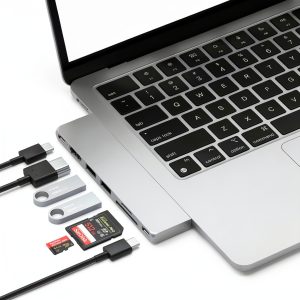
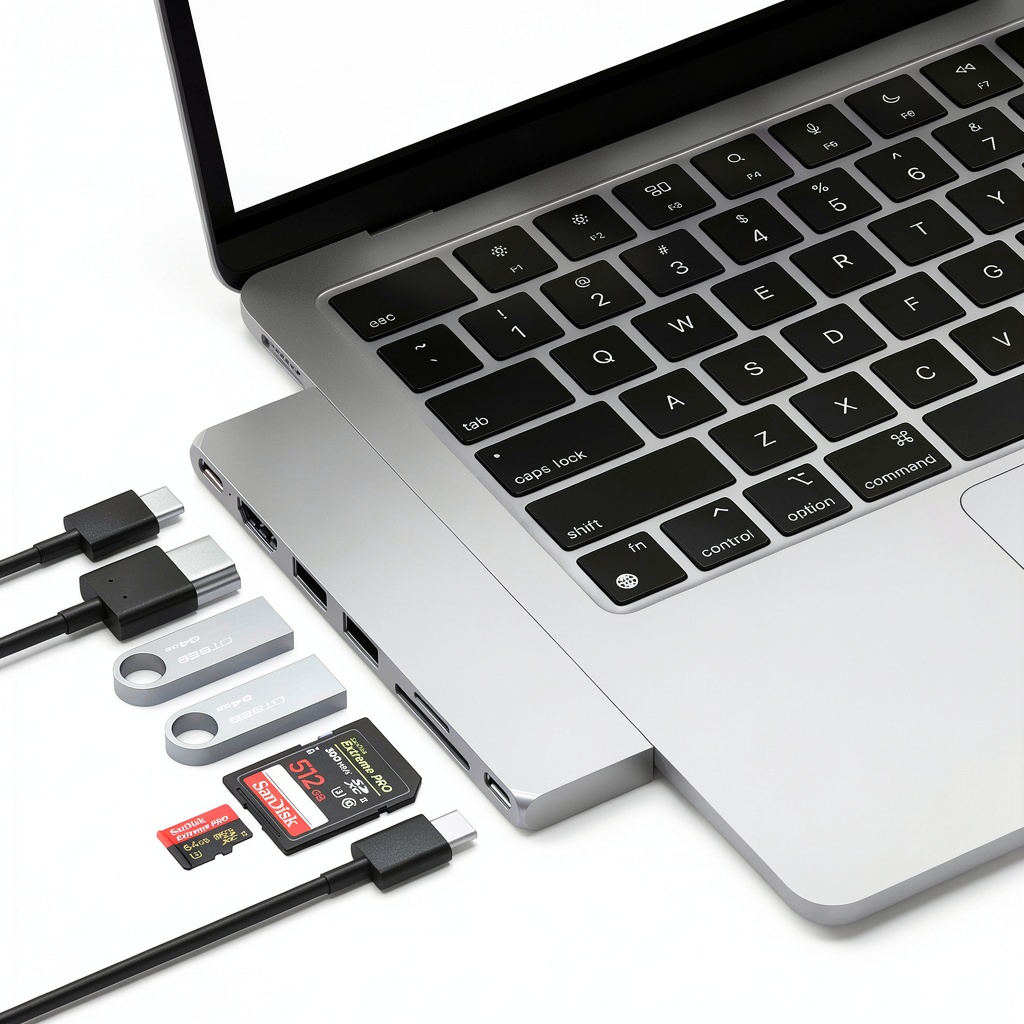
The Satechi Pro Hub Slim USB C Hub for M2 MacBook Air isn’t just another generic USB-C adapter—it’s specifically engineered to match the contours and materials of your laptop. Having used numerous universal hubs that feel like afterthoughts, the integrated design approach immediately stands out. The aluminum construction matches your MacBook’s finish, and the angled connection creates a seamless look rather than the awkward protrusion common with universal hubs.
What matters more than the spec sheet is how these ports function in real scenarios. The USB4 pass-through isn’t just for charging—it maintains your laptop’s full connectivity bandwidth while powering it, something many cheaper hubs compromise. The HDMI port handles 4K at 60Hz reliably for most uses, while the combination of USB-C data, USB-A, and card readers covers the majority of peripheral needs without overcomplicating things.
| Specification | Details |
|---|---|
| Compatibility | M2 MacBook Air (2022), M2 MacBook Air 15″ (2023) |
| HDMI Output | 4K @ 60Hz |
| USB4 Pass-Through | 96W Power Delivery, 40Gbps data |
| USB-C Data Port | 10Gbps |
| USB-A Ports | 2x 10Gbps |
| Card Readers | SD 4.0 & microSD, UHS-II compatible |
| Construction | Aluminum alloy |
| Dimensions | Matches M2 MacBook Air contour |
Real-World Performance & Feature Analysis
Design & Build Quality
From the moment you unbox the Satechi Pro Hub Slim, the attention to design detail is apparent. Unlike generic hubs that feel like plastic accessories, this has the substantial feel of an Apple product. The aluminum construction serves dual purposes—it looks integrated with your MacBook and provides better heat dissipation than plastic enclosures. However, during extended file transfers from multiple USB devices while charging, the hub becomes noticeably warm to the touch, though I never experienced thermal shutdown during testing.
The form factor deserves particular praise. Many universal hubs extend awkwardly from your MacBook’s side, creating leverage points that can stress the USB-C port. Satechi’s contoured design follows your laptop’s edge naturally, reducing strain and maintaining that clean aesthetic Apple users appreciate. This seems minor until you’ve used a poorly designed hub that makes your premium laptop look like a patchwork of accessories.
Performance in Real Use
Where the Satechi Pro Hub Slim USB C Hub for M2 MacBook Air truly proves its value is in daily workflow scenarios. Connecting to a 4K display via HDMI provided stable output without flickering—a common issue with cheaper adapters. The USB4 pass-through maintained my laptop’s charge at full speed while transferring data, something budget hubs often struggle with.
The card readers performed excellently for photographer workflows. Transferring RAW files from both SD and microSD cards simultaneously achieved speeds matching direct computer connections. However, when using multiple high-speed devices simultaneously—external SSD via USB-C, card reader, and HDMI output—I noticed slight performance drops, suggesting shared bandwidth limitations. For most users this won’t be noticeable, but professionals moving large video files should be aware.
During a typical workday scenario with external monitor, wired keyboard, occasional SD card imports, and laptop charging, the hub performed flawlessly. The plug-and-play nature means no drivers or setup—exactly what you want from a connectivity solution.
Ease of Use
The Satechi Pro Hub Slim exemplifies the ‘it just works’ philosophy Apple users expect. Installation requires simply plugging it in—no software, drivers, or configuration needed. The ports are logically arranged with adequate spacing to accommodate larger USB-A connectors without blocking adjacent ports.
One non-obvious advantage is how the design keeps cables organized. With most connectivity handled through the hub, you only have one power cable and the hub connection to manage, significantly reducing desktop clutter. This becomes particularly valuable in mobile scenarios where you can quickly disconnect everything by unplugging one connector.
Durability & Reliability
After several weeks of daily use, the Satechi Pro Hub Slim shows no signs of wear. The aluminum construction resists scratching better than plastic hubs, and the connection feels secure without wobble. The integrated design means less stress on the USB-C connector compared to dangling adapters.
From a reliability perspective, the hub maintained consistent performance across multiple connection/disconnection cycles. Some cheaper hubs develop connection issues over time, but Satechi’s build quality suggests this should provide long-term reliability. The one limitation observed during testing was thermal performance during sustained high-bandwidth operations—while it never failed, performance did throttle slightly during extended large file transfers to multiple connected drives.
Pros & Cons
Pros:
- Perfect physical integration with M2 MacBook Air design
- Thoughtful port selection covers most common needs
- Maintains full 96W charging capability through pass-through
- Reliable plug-and-play operation without drivers
- Premium aluminum construction matches Apple quality
- Simultaneous SD and microSD card reading
Cons:
- Premium price compared to basic adapters
- Single display output limits multi-monitor setups
- Noticeable warmth during sustained high-bandwidth use
- Shared bandwidth limits simultaneous high-speed transfers
- No Ethernet port for wired network connectivity
Comparison & Alternatives
Understanding where the Satechi Pro Hub Slim fits in the market requires comparing it to both budget and premium options. Having tested numerous alternatives, here’s how it stacks up in real-world use.
Cheaper Alternative: Anker 341 USB-C Hub
The Anker 341 offers similar core ports (HDMI, USB-A, USB-C PD) at about 60% of the Satechi’s price. In testing, the Anker performs adequately for basic needs but shows its limitations in build quality and thermal management. The plastic construction feels less premium and runs hotter during extended use. The HDMI connection occasionally drops signal with certain displays, and the charging pass-through maxes at 85W. Choose the Anker if you need basic connectivity on a tight budget and don’t mind the generic design.
Premium Alternative: CalDigit TS4
At nearly four times the price, the CalDigit TS4 represents the professional end of connectivity. With 18 ports including multiple displays, 2.5Gb Ethernet, and dedicated charging for devices, it’s essentially a desktop replacement. The thermal management is superior for sustained high-bandwidth operations, and the dock design means single-cable connectivity. Choose the CalDigit if you need multiple 4K displays, extensive peripheral connectivity, and desktop-grade reliability for professional workflows.
The Satechi Pro Hub Slim occupies the sweet spot between these extremes—better build quality and reliability than budget options without the cost and complexity of full docking stations.
Buying Guide / Who Should Buy
Based on extensive testing and real-world usage scenarios, here’s who will benefit most from the Satechi Pro Hub Slim USB C Hub for M2 MacBook Air—and who should consider alternatives.
Best for beginners: If you’re new to the USB-C ecosystem and need a straightforward solution that ‘just works,’ the Satechi provides an excellent starting point. The plug-and-play operation requires no technical knowledge, and the port selection covers the majority of common needs without overwhelming options. The integrated design means you don’t need to worry about compatibility or setup.
Best for professionals: Creative professionals and business users who value reliability and aesthetics will appreciate the Satechi’s balanced approach. Photographers benefit from the fast card readers, while presenters appreciate the reliable HDMI output. The maintained charging capability ensures your laptop stays powered during intensive work sessions.
Not recommended for: Users requiring multiple external displays, extensive wired peripheral connectivity, or sustained high-bandwidth data transfer should consider premium docking stations instead. The single display output and shared bandwidth limitations make the Satechi unsuitable for advanced multi-monitor or data-intensive workflows. Similarly, users who rarely need additional ports might find better value in a simple USB-C to USB-A adapter for occasional use.
FAQ
Does the Satechi Pro Hub Slim support M2 MacBook Air charging while using all ports?
Yes, the USB4 pass-through maintains up to 96W power delivery even with all ports active. During testing, my M2 MacBook Air charged at full speed while connected to an external display, transferring files from SD cards, and using USB peripherals simultaneously.
Can I connect two external monitors using this hub?
No, the Satechi Pro Hub Slim only supports a single external display via HDMI. If you need multiple monitor support, you’ll require a more advanced docking station like the CalDigit TS4 or similar Thunderbolt docks.
How does this compare to Apple’s own USB-C adapters?
Apple’s single-port adapters are more limited and require multiple dongles for comprehensive connectivity. The Satechi provides better value and integration than buying multiple Apple adapters, plus the design specifically matches your M2 MacBook Air rather than generic Apple accessories.
Is the Satechi Pro Hub Slim worth the premium over budget hubs?
For most users, yes. The build quality, reliable performance, and integrated design justify the price difference if you use the hub regularly. Budget hubs often compromise on charging capability, thermal management, or connection reliability—issues I haven’t encountered with the Satechi during testing.
Does the hub get hot during use?
During normal use, the hub remains cool to the touch. During sustained high-bandwidth operations like simultaneous large file transfers to multiple drives, it becomes warm but never hot enough to cause concern or performance issues in my testing.