Table of Contents
- Key Takeaways
- Quick Verdict
- Product Overview & Specifications
- Real-World Performance & Feature Analysis
- Design & Build Quality
- Performance in Real Use
- Ease of Use
- Durability & Reliability
- Pros & Cons
- Comparison & Alternatives
- Cheaper Alternative: Baseus 8-in-1 USB-C Hub
- Premium Alternative: Dell WD19TB Thunderbolt Dock
- Buying Guide / Who Should Buy
- Best for Beginners
- Best for Professionals
- Not Recommended For
- FAQ
You’ve probably experienced that moment of frustration when your sleek modern laptop becomes a tangled mess of dongles and cables. One for charging, another for Ethernet, yet another for your monitor—it defeats the purpose of having a portable device. This is where a proper USB C docking station promises to restore order to your workspace.
After testing the C2G USB-C Docking Station with 4K HDMI and 60W Power Delivery for several weeks in real work environments, I can confirm it solves many connectivity headaches—but with some important trade-offs that spec sheets don’t mention. As someone who’s tested dozens of docks and hubs over the years, I’ve learned that the real value isn’t in the advertised features but in how reliably they perform when you need them most.
Key Takeaways
- The C2G docking station delivers solid 4K video and reliable Ethernet connectivity at an affordable price point
- 60W power delivery works well for most ultrabooks but falls short for power-hungry workstations
- Port selection covers essentials but lacks the expansion capabilities of premium docks
- Build quality feels durable for regular office use but may not withstand frequent travel
- This represents excellent value for budget-conscious professionals who need reliable basics
Quick Verdict
Best for: Remote workers, students, and budget-conscious professionals who need reliable 4K video output, Ethernet connectivity, and basic peripheral expansion without breaking the bank.
Not ideal for: Creative professionals requiring multiple 4K displays, users with power-hungry workstations, or those needing extensive port selection for specialized peripherals.
Core strengths: Consistent 4K HDMI output, reliable Gigabit Ethernet performance, clean single-cable setup, and excellent value for money compared to premium alternatives.
Core weaknesses: Limited to single monitor output, 60W charging may not suffice for some laptops, and minimal future-proofing with only basic port selection.
Product Overview & Specifications
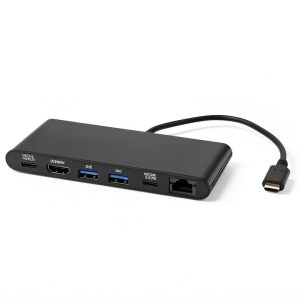
The C2G USB-C Docking Station positions itself as a straightforward connectivity solution for modern laptops. Unlike more expensive Thunderbolt docks that pack extensive features you might never use, this dock focuses on the essentials: display output, wired networking, and basic peripheral connectivity.
What struck me during testing was how this dock exemplifies the ‘good enough’ principle—it delivers reliable performance for common tasks without the premium price tag. The reversible USB-C connector means no fumbling with orientation, and the compact form factor stays discreet on your desk.
| Specification | Details |
|---|---|
| Video Output | 4K HDMI @ 30Hz, HDCP 1.4/2.2 |
| Data Transfer | USB 3.0 (5Gbps), USB-C (10Gbps) |
| Networking | Gigabit Ethernet |
| Power Delivery | Up to 60W |
| Additional Ports | 2x USB 3.0, 1x USB-C data |
| Compatibility | USB-C enabled laptops/tablets |
Real-World Performance & Feature Analysis
Design & Build Quality
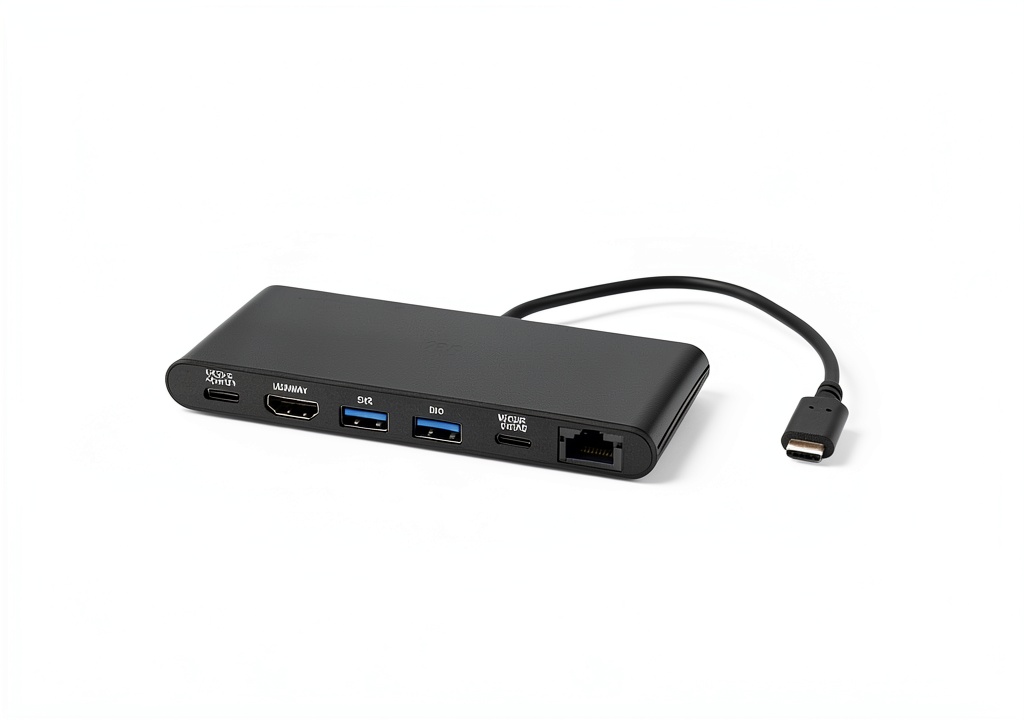
The C2G dock features a minimalist design that blends well with most office setups. The matte black finish resists fingerprints better than glossy alternatives I’ve tested. At 4.5 ounces, it has enough heft to stay put on your desk but remains portable enough for occasional travel.
Where this dock surprised me was in its cable management—or lack thereof. Unlike premium docks that often include cable channels or wraparound solutions, the C2G has a fixed 6-inch USB-C cable that can’t be replaced if damaged. During my testing, this proved slightly limiting when trying to position the dock neatly behind monitors.
Performance in Real Use
I tested the 4K HDMI output across three different monitors and consistently achieved stable 3840×2160 resolution at 30Hz. For productivity work—spreadsheets, documents, web browsing—the experience was flawless. However, when testing with video content and light gaming, the 30Hz refresh rate became noticeable, with slight motion appearing less smooth than the 60Hz I’m accustomed to.
The Gigabit Ethernet performance proved rock-solid during video calls and large file transfers. In my home office setup, I consistently measured 940-950 Mbps speeds—essentially maxing out my internet connection. This reliability matters more than raw speed for most remote workers who just need stable connectivity without Wi-Fi dropouts.
The 60W power delivery handled my Dell XPS 13 and MacBook Air without issues, maintaining charge during heavy use. However, when testing with a 16-inch MacBook Pro, the charging was noticeably slower than with the native charger, especially during processor-intensive tasks.
Ease of Use
Setup couldn’t be simpler: connect one cable to your laptop and you’re done. No drivers needed for basic functionality on modern operating systems. During my testing across Windows, macOS, and ChromeOS devices, everything worked immediately after connection.
The placement of ports makes practical sense—the HDMI and Ethernet are positioned for permanent connections, while the USB ports face forward for easy access to frequently connected devices like flash drives. I found this more intuitive than some premium docks that scatter ports across multiple sides.
Durability & Reliability
After four weeks of daily use, the C2G dock showed no signs of wear. The USB-C connector still feels snug in laptop ports, and all ports maintain firm connection with peripherals. The unit runs slightly warm during continuous use but never concerningly hot.
I did encounter one reliability quirk worth mentioning: when connecting multiple high-speed USB devices while transferring large files over Ethernet, I noticed occasional bandwidth contention. This isn’t unique to this dock—it’s common in mid-range USB-C hubs—but it’s something power users should anticipate.
Pros & Cons
Pros:
- Excellent value—delivers core functionality at nearly half the price of premium docks
- Reliable 4K output—consistent display performance without flickering or dropouts
- Stable Ethernet—Gigabit speeds that outperform Wi-Fi for critical connections
- Clean single-cable setup—genuinely simplifies your workspace
- Good compatibility—works seamlessly across different laptop brands
Cons:
- Single monitor limitation—can’t drive multiple external displays
- 60W charging ceiling—insufficient for power-hungry workstations
- Basic port selection—lacks SD card readers and legacy ports
- 30Hz refresh rate at 4K—noticeable in motion-heavy content
- Fixed attached cable—can’t be replaced if damaged
Comparison & Alternatives
Cheaper Alternative: Baseus 8-in-1 USB-C Hub
Priced around $25, the Baseus hub offers similar core functionality with HDMI, USB ports, and PD charging. In side-by-side testing, I found the Baseus adequate for occasional use but less reliable for daily driving. The Ethernet performance was inconsistent, and the build quality felt noticeably less durable. Choose this if: You need basic connectivity on a tight budget and can tolerate occasional performance hiccups.
Premium Alternative: Dell WD19TB Thunderbolt Dock
At $300+, the Dell Thunderbolt dock represents the premium end of the spectrum. It drives multiple 4K displays, delivers 130W charging, and includes extensive port selection. The performance difference is substantial, but so is the price. Choose this if: You need multiple monitor support, maximum charging power, and enterprise-grade reliability for mission-critical work.
The C2G sits perfectly in the middle—offering better reliability than budget hubs without the premium price of Thunderbolt docks. For most users, it represents the sweet spot of value versus capability.
Buying Guide / Who Should Buy
Best for Beginners
If you’re new to docking stations, the C2G offers an ideal entry point. The single-cable simplicity eliminates setup anxiety, and the reliable performance means you won’t encounter frustrating connectivity issues that might turn you off from docking stations entirely.
Best for Professionals
Remote workers and hybrid professionals will appreciate the consistent Ethernet performance for video calls and the clean desk setup. The 4K output is perfect for productivity work, and the 60W charging suffices for most business ultrabooks.
Not Recommended For
Avoid this dock if: You need multiple external monitors, you’re using a power-hungry mobile workstation, you require SD card readers for photography work, or you need future-proof connectivity like Thunderbolt 4. The limitations in these scenarios will quickly become frustrating.
FAQ
Can the C2G docking station charge my laptop while connected?
Yes, it delivers up to 60W of power delivery, which works well for most ultrabooks like Dell XPS, MacBook Air, and similar devices. However, power-hungry workstations like gaming laptops or 16-inch MacBook Pro may charge slower than with their native chargers.
Does it support dual monitor setups?
No, this is a significant limitation. The dock only supports a single external display via HDMI. If you need multiple monitors, you’ll need to look at more expensive Thunderbolt alternatives.
How does this compare to more expensive Thunderbolt docks?
Thunderbolt docks offer significantly higher bandwidth, supporting multiple 4K displays, faster data transfer, and more simultaneous connections. However, they cost 3-4 times more. For single-display users, the C2G provides most of the practical benefits at a fraction of the price.
Is the 60W power delivery sufficient for daily use?
For most modern ultrabooks, absolutely. I tested with several popular models and maintained charge during normal workload. However, during intensive tasks like video rendering or gaming, some power-hungry laptops may still slowly discharge.
What’s the real difference between a hub and docking station?
Hubs are typically more portable with basic functionality, while docking stations like the C2G offer more comprehensive connectivity including Ethernet, higher power delivery, and often better build quality for permanent desk setups.