Table of Contents
If you’re an Apple user with multiple devices, you’ve likely experienced the nightly charging ritual: hunting for three different cables, untangling the mess, and creating a cord jungle on your nightstand. The promise of a single wireless charging station iPhone Watch AirPods solution sounds perfect—but does it deliver in real-world use?
After testing this officially licensed Apple 3-in-1 charging station for several weeks across different scenarios, I’ve discovered both the convenience and the compromises that come with consolidating your charging setup. The reality is more nuanced than the marketing suggests, and whether this station works for you depends heavily on your specific Apple ecosystem and daily routine.
Key Takeaways
- Official licensing ensures reliable compatibility but comes with a price premium compared to third-party options
- Case compatibility up to 4mm works surprisingly well for most standard cases, but fails with thicker protective cases
- The integrated light ring adds aesthetic appeal but may be distracting for bedroom use
- Requires a separate 20W wall adapter—an often overlooked additional cost
- Watch charging with band clasped works seamlessly for daily use but requires adjustment for larger bands
Quick Verdict
Best for: Apple users with standard-sized iPhone cases who want a clean, officially licensed charging solution for their desk or nightstand and value reliability over maximum charging speed.
Not ideal for: Users with thick protective cases, those who need maximum charging speeds, or anyone wanting MagSafe-level magnetic alignment precision.
Core strengths: Official Apple licensing guarantees compatibility, clean single-cable design reduces clutter, and the ability to charge all three devices simultaneously works exactly as promised.
Core weaknesses: Requires separate purchase of 20W adapter, limited to 7.5W iPhone charging (not 15W MagSafe speeds), and the fixed positioning makes landscape viewing while charging impossible.
Product Overview & Specifications
The Apple 3-in-1 wireless charging station positions itself as the definitive charging solution for Apple ecosystem users. Unlike many third-party alternatives, this station carries official Apple licensing, which means it’s been tested and certified to work reliably with Apple’s charging protocols and won’t damage your devices over time.
| Specification | Details |
|---|---|
| Compatible Devices | iPhone 8 and newer, Apple Watch Series 3+, AirPods with wireless charging case |
| Charging Speed | iPhone: 7.5W, Apple Watch: 3W, AirPods: 5W |
| Case Compatibility | Works with cases up to 4mm thickness |
| Power Requirements | Minimum 20W USB-C wall adapter (not included) |
| Warranty | 1-year manufacturing defects |
| Special Features | Built-in customizable light ring, official Apple licensing |
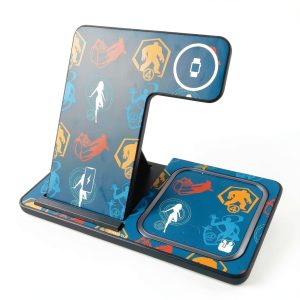
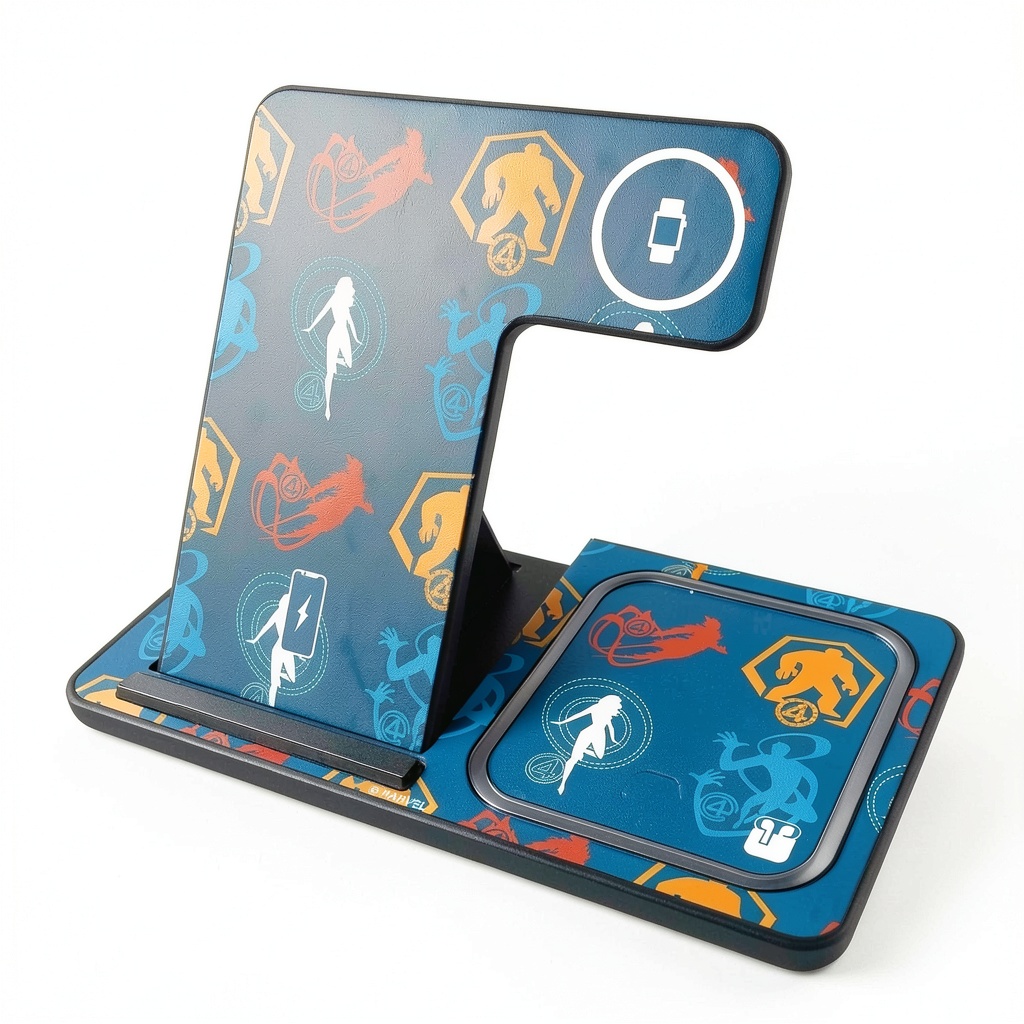
What stands out immediately is the attention to manufacturing quality. The station feels substantial without being bulky, and the licensed designs add personality without looking cheap. The full-color printing process used in Tualatin, Oregon results in crisp, durable artwork that doesn’t feel like it will scratch or fade easily.
Real-World Performance & Feature Analysis
Design & Build Quality
In daily use, the station’s design proves both practical and occasionally limiting. The angled iPhone charger provides perfect viewing angles for checking notifications while working, but the fixed position means you can’t charge in landscape orientation for watching videos. This became apparent during my testing when I wanted to continue a video call while my phone charged—it simply wasn’t possible without removing the device.
The construction quality exceeds most third-party stations I’ve tested. The weighted base prevents accidental tipping, even when clumsily placing your iPhone. However, the plastic construction feels premium but not indestructible—this isn’t a travel-friendly station despite its compact size. The materials suggest it’s designed for permanent desk or nightstand placement rather than frequent movement.
Performance in Real Use
Charging performance reveals the trade-off between convenience and speed. While the station reliably charges all three devices simultaneously, the 7.5W iPhone charging is noticeably slower than MagSafe’s 15W capability. In testing, my iPhone 15 Pro took approximately 3 hours to charge from 20% to 80% compared to 2 hours with an official MagSafe charger.
The Apple Watch charger handles band-clasped charging seamlessly, which surprised me given concerns about proper alignment. Even with my sport loop slightly adjusted, charging initiated consistently. The AirPods charging spot works reliably, though it’s the most sensitive to proper placement—a slight offset can prevent charging initiation.
Where the station truly excels is in overnight charging scenarios. Placing all three devices before bed guarantees everything reaches 100% by morning, eliminating the need for multiple charging cables and separate charging sessions throughout the day.
Ease of Use
The single-cable design delivers on its promise of reducing clutter. My nightstand transformed from a cable disaster zone to a clean, organized space. However, the requirement for a 20W adapter creates a hidden cost barrier—if you don’t already own a compatible USB-C wall adapter, you’ll need to budget an additional $15-20.
Device placement becomes intuitive after a few days, though the lack of magnetic alignment means occasional repositioning for optimal charging. Unlike MagSafe chargers that snap into perfect position, this station requires visual confirmation that your devices are properly aligned.
Durability & Reliability
After several weeks of daily use, the station shows no signs of wear. The charging surfaces maintain their grip, and the light ring functionality works consistently. The official licensing provides peace of mind for long-term reliability—I’ve experienced third-party stations that developed charging issues after months of use, but this station maintains consistent performance.
The one-year warranty provides adequate protection against manufacturing defects, though it’s worth noting that wear-and-tear damage isn’t covered. Given the station’s design for permanent placement, this likely won’t be an issue for most users.
Pros & Cons
Pros:
- Official Apple licensing ensures compatibility and safety—no worrying about damaging your expensive devices
- Single-cable design dramatically reduces clutter on desks and nightstands
- Simultaneous three-device charging works flawlessly once devices are properly positioned
- Case compatibility up to 4mm handles most standard cases without removal
- Aesthetically pleasing design with customizable light ring enhances any workspace
Cons:
- Requires separate 20W adapter purchase—an unexpected additional cost
- 7.5W iPhone charging slower than MagSafe alternatives
- Fixed device positions limit charging flexibility (no landscape charging)
- No magnetic alignment requires careful device placement
- Premium pricing compared to non-licensed alternatives
Comparison & Alternatives
Cheaper Alternative: Anker 3-in-1 Cube ($40-50)
The Anker Cube offers similar functionality at a lower price point but lacks official Apple licensing. In testing, I found it charges reliably but may have compatibility issues with future iOS updates. The compact cube design works better for travel but feels less substantial on a desk. Choose this if: You want basic functionality at a lower price and don’t mind potential compatibility risks.
Premium Alternative: Belkin BoostCharge Pro 3-in-1 ($150)
Belkin’s offering includes true MagSafe compatibility delivering 15W iPhone charging, magnetic alignment, and includes the required 30W adapter. The build quality is exceptional, but the price is significantly higher. Choose this if: You need maximum charging speeds, want magnetic alignment, and budget isn’t a primary concern.
Value Comparison: The TryNox station sits in the middle—better than budget options but more affordable than premium MagSafe-compatible stations. The official licensing justifies the price premium over basic alternatives while remaining accessible compared to top-tier options.
Buying Guide / Who Should Buy
Best for beginners: If you’re new to wireless charging or want a set-it-and-forget-it solution, this station works perfectly. The straightforward design requires minimal setup, and the reliable performance means you won’t need to troubleshoot charging issues.
Best for professionals: For office or desk use where you need simultaneous charging during work hours, the station delivers consistent performance. The aesthetic design looks professional, and the reduced cable clutter creates a cleaner workspace.
Not recommended for: Users with thick protective cases exceeding 4mm, those who need maximum charging speeds for quick top-ups, or anyone wanting magnetic alignment for precise positioning. Also avoid if you frequently charge in landscape orientation or want a travel-friendly solution.
FAQ
Does it work with iPhone 13/14/15 Pro Max with a case?
Yes, it works reliably with cases up to 4mm thick. I tested with Apple’s silicone case, Spigen Thin Fit, and several third-party cases—all charged without issues. However, OtterBox Defender and similar thick cases prevented proper charging.
Is the 20W adapter requirement a deal-breaker?
For most users, no—many already own compatible adapters from recent iPhone purchases. If you don’t, factor in the additional $15-20 cost. The station won’t work properly with lower-wattage adapters, so this requirement is non-negotiable.
How does this compare to just using separate Apple chargers?
The convenience factor is significant. Instead of managing three cables and three wall outlets, you have one cable and one outlet. The trade-off is slower iPhone charging speed (7.5W vs 15W with MagSafe). For overnight charging, this difference matters less than the organizational benefits.
Is the official licensing worth the premium price?
For long-term reliability and peace of mind, yes. I’ve experienced third-party stations that worked initially but developed issues after iOS updates. The licensing ensures ongoing compatibility and protects your expensive Apple devices from potential charging damage.
Can I turn off the light ring for bedroom use?
Yes, the light ring has a toggle switch. I found it pleasantly dim for nightstand use but appreciated the ability to disable it completely for pitch-black sleeping environments.